
iPhone Duo 的首发供货,我的判断是不会太宽松。近期产业链报道提到,首批整机良品率仍在爬坡,铰链和折叠屏相关环节也有供货约束;如果首发良品率和产能爬坡不及预期,我认为 Duo 供货紧张可能持续到年底。36氪转载的产业链报道援引匿名人士,不能等同于官方良品率数据。这是基于公开报道的情景判断,不是 Apple 对库存的确认。
I do not expect iPhone Duo launch supply to be generous. Recent supply-chain reporting says first-batch yield is still ramping up, while hinge and foldable-display components have also faced constraints. If launch yield and production ramp-up fall short of expectations, I think Duo availability could remain tight through the end of the year. The supply-chain report republished by 36Kr cites anonymous sources, not official yield data. This is a scenario-based view based on public reporting, not Apple’s confirmation of inventory.
如果你准备在首发阶段买 Duo,真正有用的是更快发现某个地区、型号和门店的状态变化。这是一款桌面库存监控工具:选好地区、品类、门店和型号后,它会按设定间隔查询,并在状态变成“有货”时发出提醒。
If you plan to buy a Duo at launch, the useful advantage is finding a change in a specific region, model, and store sooner. This desktop stock-monitoring tool lets you select a region, category, store, and product, then checks at the configured interval and alerts you when a target reports “in stock.”
首发库存查询:为什么用监控,而不是手工刷新? / Why monitor launch stock instead of refreshing manually?
手工刷新 Apple 购买页的问题不是不会刷新,而是你很难同时盯住多个门店、多个容量和颜色。监控列表会把这些目标放在一张表里,状态分成“有货”“无货”和“未知”。“未知”很关键:请求被拦截、限流、网络失败或接口结构变化时,程序不会把失败假装成无货,而会保留原因并提示当前结果不可信。
The problem with manually refreshing Apple’s purchase page is not the act of refreshing itself. It is the difficulty of watching several stores, capacities, and colors at once. The monitor puts those targets in one table and distinguishes “in stock,” “out of stock,” and “unknown.” “Unknown” matters: when a request is blocked, rate-limited, interrupted, or returned in an unexpected format, the tool does not pretend the item is out of stock. It keeps the reason and marks the result as untrusted.
工具默认每 30 秒查一轮,最低间隔是 5 秒;Apple 的请求频率限制可能让实际等待时间变长。它不是毫秒级实时服务,也不是自动抢购器。收到提醒后,仍然要去 Apple 官网确认商品、选择门店、加入购物袋并完成结账;库存也可能在提醒后被别人买走,程序不预留库存,不能保证买到。
The default interval is 30 seconds, with a five-second lower bound; Apple’s request limits can make the actual wait longer. This is not millisecond-level live data and it is not an automatic checkout tool. After an alert, you still confirm the product, choose a store, add it to the bag, and check out on Apple’s website. Stock can disappear after an alert, and the tool neither reserves inventory nor guarantees a purchase.
三张界面图,先看懂它在做什么 / Three interface views
下面三张图来自源码 React 前端的独立浏览器演示环境。我使用了明确的示例数据和 IPC mock,没有连接当前桌面应用,也没有读取或修改现有配置;图中的“有货”只用于解释界面,不是此刻的实时库存。
The three images below come from an isolated browser fixture running the source React frontend. They use clearly marked sample data and IPC mocks; the current desktop app was not connected, and its configuration was not read or changed. The “in stock” rows explain the interface only and are not live inventory.
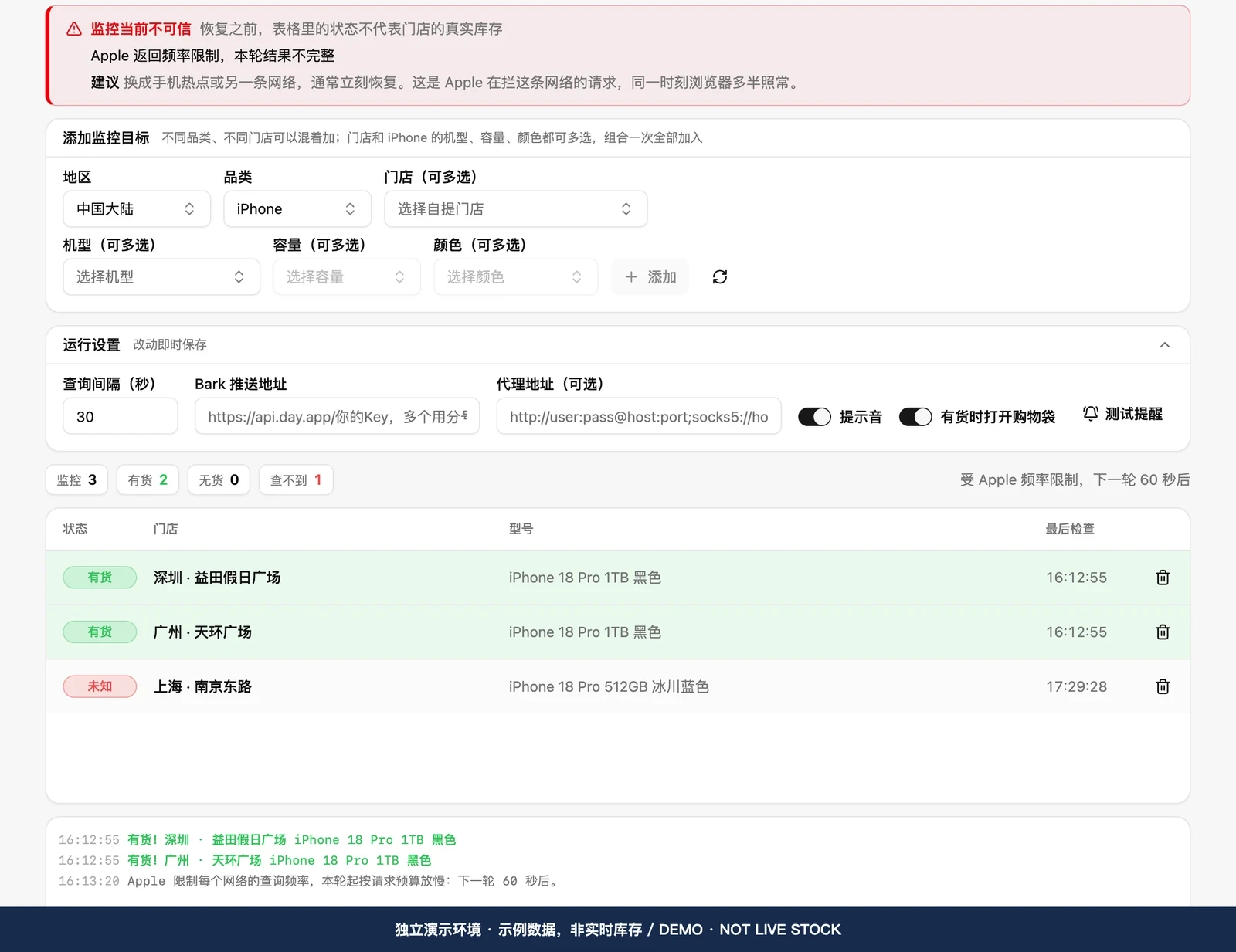
总览页把添加目标、运行设置、状态统计、监控表格和日志放在一起。你可以看到同一款 iPhone 18 Pro 1TB 黑色在两家店显示为示例“有货”,另一条目标显示“未知”,上方同时出现频率限制告警。这个组合正好说明:工具会报告状态,也会报告查询是否可信。
The overview combines target selection, run settings, status counts, the monitoring table, and logs. In the sample, the same iPhone 18 Pro 1TB in black is shown as “in stock” at two stores, while another target is “unknown” and a rate-limit warning is visible above. This illustrates that the tool reports both a status and whether the query can be trusted.
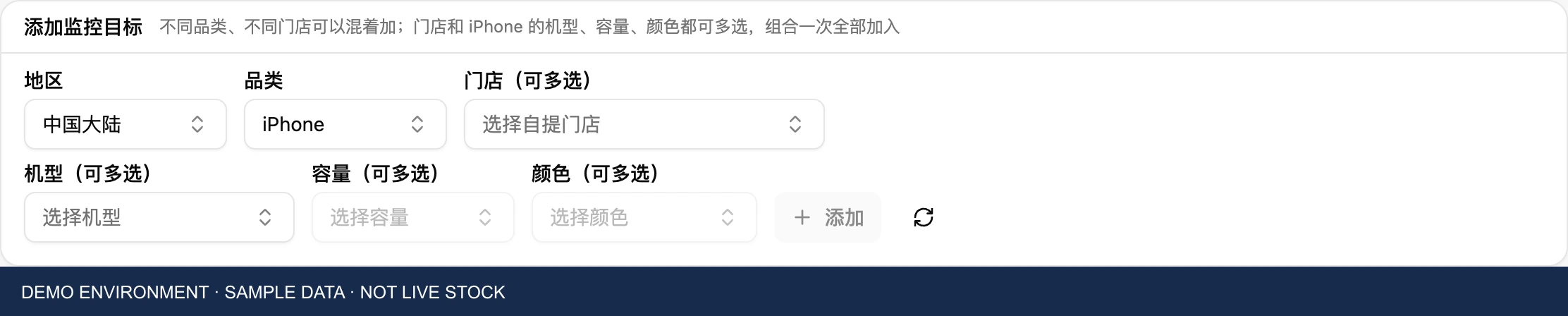
添加目标按地区、品类、门店和型号展开。iPhone 还可以继续按机型、容量、颜色多选,适合首发时把几个组合一次加入;不同门店和不同品类也可以混在同一张监控表里。选好后点“添加”,再点右上角“开始”。如果还找不到 Duo,先尝试“从 Apple 官网更新型号列表”;它只刷新已经配置的购买页,新购买页可能仍需要升级程序,目录里出现型号也不代表已经有货。
Adding a target starts with region, category, store, and product. iPhone targets can then be selected by family, capacity, and color, which is useful for adding several launch combinations at once. Different stores and categories can also share the same monitoring table. Click “Add” after making your choices, then “Start” at the top right. If Duo is missing, try “Refresh product list from Apple”; this only refreshes configured purchase pages. A new purchase page may still require an app update, and a model appearing in the catalogue does not mean it is in stock.

运行设置里可以调整查询间隔、提示音、有货时是否打开购物袋,以及可选的 Bark 通知。在 iPhone 安装 Bark 后,把它提供的设备推送地址填进输入框,再点“测试提醒”,确认系统通知、声音和手机推送是否通畅;留空就关闭 Bark。持续有货不会每轮重复提醒,离开有货状态后再次有货才重新提醒。截图中的地址全部是占位提示,未放入真实推送密钥、代理地址或用户配置。设置改动会即时保存;如果要公开分享截图,也应先确认画面里没有自己的通知地址。
The run settings cover the query interval, sound, whether to open the shopping bag when a target is available, and optional Bark notifications. Install Bark on your iPhone, paste its device push address into the field, and click “Test notification” to check desktop notifications, sound, and phone delivery; leave the field empty to disable Bark. Continuous availability does not trigger an alert every round; another alert follows when a target leaves the in-stock state and returns to it. The addresses in this image are placeholders; no real push key, proxy address, or user configuration is included. Settings are saved immediately, so check that your own notification address is not visible before sharing a screenshot.
Mac 和 Windows 怎么安装 / Installing on Mac and Windows
下载入口只放这个页面:https://www.idatariver.com/zh-cn/project/apple-store-iphone-search-ca6a。我核看到的页面标题是“Apple Store iPhone Inventory Inquiry Software”,页面显示库存大于等于 1 限购一件、自动发货、价格为 9.9 美元;页面没有展开具体安装包版本和系统要求,购买前请先核对卖家页面当前说明。
Use this page as the only download entry: https://www.idatariver.com/zh-cn/project/apple-store-iphone-search-ca6a. When I checked it, the page was titled “Apple Store iPhone Inventory Inquiry Software” and displayed “inventory >=1, limit one per order, automatic delivery” at USD 9.9. It did not provide detailed installer versions or system requirements on the visible page, so check the seller’s current information before purchasing.
Mac 用户先按芯片选择 Apple Silicon 或 Intel 版本的 .dmg,打开磁盘映像后,把应用放进“应用程序”。如果 macOS 拦截安装,可在“隐私与安全性”中按系统提示确认打开。
On Mac, choose the Apple Silicon or Intel .dmg for your processor, open the disk image, and move the app to Applications. If macOS blocks it, follow the system prompt in Privacy & Security to confirm opening it.
Windows 用户选择 x64-setup.exe 或 .msi 安装包,双击并按安装向导完成安装。因为安装包可能没有代码签名,SmartScreen 出现提示时,确认下载来源后选择“更多信息”→“仍要运行”。两套系统都需要保持联网和唤醒;关闭窗口通常只是收进托盘,真正退出要从托盘菜单退出。
On Windows, choose the x64-setup.exe or .msi package, double-click it, and follow the installation wizard. If SmartScreen warns that the installer is unsigned, confirm the download source and choose “More info” → “Run anyway.” Both systems need an internet connection and must stay awake. Closing the window normally sends it to the tray; use the tray menu to quit completely.
常见问题 / Frequently asked questions
iPhone Duo 首发怎么查直营店自提库存? 先选地区和门店,再选型号、容量和颜色;查询结果要连同门店和时间一起看。若目录还没有 Duo,可以尝试更新型号列表,但出现型号不等于已有可自提库存。
How can I check in-store pickup stock for an iPhone Duo launch? Select a region and store, then the model, capacity, and color. Read each result with its store and check time. If Duo is missing from the catalogue, try refreshing the product list; its appearance there does not imply pickup stock is available.
补货提醒能保证抢到吗? 不能。提醒只表示某次查询报告有货,查询可能延迟或受限,直营店自提名额也可能很快变化;请到 Apple 官网确认并自行完成结账。
Does a restock alert guarantee a purchase? No. An alert only reports availability from a particular check. Requests can be delayed or rate-limited, and pickup stock can change quickly. Confirm availability and complete checkout yourself on Apple’s website.
使用时记住三点 / Three things to remember
第一,地区、型号和门店要一起看,目录会随当地 Apple 在线商店变化。第二,“未知”不是“无货”,看到监控不可信时不要根据旧状态下单。第三,提醒只是把你带到购买动作之前,真正的商品确认、购物袋、结账和付款仍由你在 Apple 官网完成。
First, read region, model, and store together because the catalogue follows the local Apple online store. Second, “unknown” does not mean “out of stock”; do not order based on an old result while the monitor is marked untrusted. Third, an alert only brings you to the next step. Product confirmation, the bag, checkout, and payment still happen on Apple’s website.